
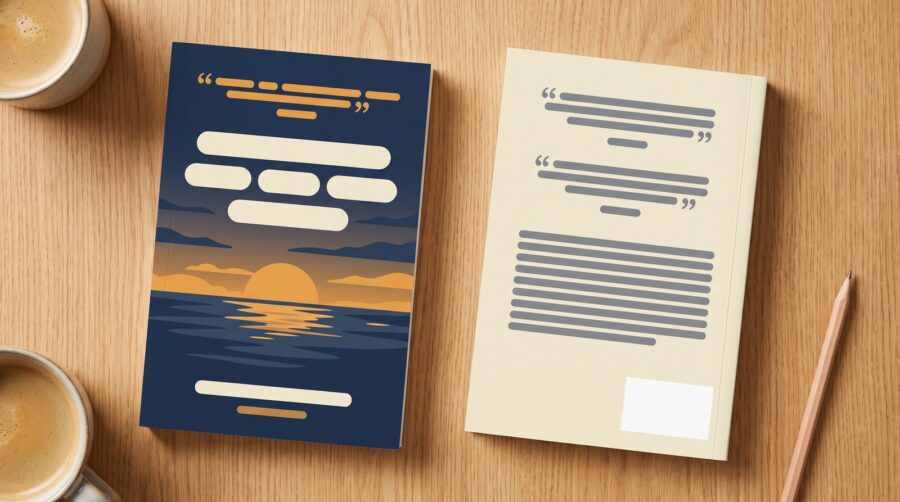
Review quotes on a book cover are quoted praise for the book, used with permission: invited endorsements (often from experts in the field), excerpts from editorial or commissioned reviews, and lines from other authors well known to target readers. A short, strong quote on the front cover gives the praise prominence, and one or two more often go on the back, with the description. Extra praise goes on a page inside the book.
What Does a Review Quote Do on a Book’s Front Cover?
Most readers find a self-published book online, so the cover image on the book’s product page is where a front-cover quote does its work. One or more short, strong quotes there is a bold signal of the book’s value, put in front of a potential reader before they have read anything else about the book. The quote might come from an endorsement you invited from an expert in your field, from an editorial review published by a magazine, newspaper or review service (including reviews an author commissions and pays for), or from another author writing in the same genre. Reusing a reader’s review from a store page is a different question, covered in can you quote a reader’s review in your book marketing?
Beware of shrinking the title too much to make room for a quote. A quote that crowds the artwork, or pushes the title smaller, costs more than it adds if the title becomes unreadable in a thumbnail (the small cover image shown in search results). We don’t usually try to make the quote itself readable in a thumbnail, but we recommend that it be sized so it can be read at the larger cover size shown on the retailer’s product page. After all, this is where the potential reader will make their purchasing decision.
Note that the book description guidelines for Kindle Direct Publishing list “Reviews, quotes, or testimonials” among the things a listing description cannot contain (although we do find listings that seem to get away with ignoring this rule). Amazon has a separate Editorial Reviews section for quotes, which you fill in yourself, explained in what paid editorial reviews are and where they go on your book page.
Where Do Review Quotes Go on the Back Cover?
The back cover usually holds the book’s description (a short summary of the story or subject), an author bio and the barcode. If you are adding review quotes, they conventionally go at the top or just after the description, but this is convention rather than rule.
Since space on a paperback cover is limited, many authors choose to move the author bio into the book itself rather than reduce the text size to fit quotes alongside everything else. The bio then usually goes in the back matter (the pages after the main text ends). Some authors fill the back cover with quotes alone, leaving out the description and their bio. The barcode stays either way, of course.
On a hardcover with a dust jacket, some of this material can move onto the jacket’s inside flaps, which leaves more room on the back. In that case it is common to put the description on the front flap, which readers usually see first, and the author bio on the back flap. Bear in mind that the flaps do not show on an online product page, though, so this arrangement serves readers browsing in a bookshop or library more than shoppers online.
Wherever the quotes go on the cover, keep them inside the template’s safe zone and clear of the barcode. The safe zone is the area far enough from the edges that nothing is trimmed off, as explained in how to read a print book cover template.
Where Do Extra Endorsements Go Inside the Book?
Endorsements that will not fit on the cover can go on a praise page in the front matter (the pages before the main text begins). Three positions are common: page i, the very first printed page, ahead of the half title (the page that carries only the book’s title); the reverse side of the half title, facing the title page; or a section headed “Praise for [book title],” placed after the copyright page.
If you are not including the back cover inside your ebook file, consider copying any review quotes from the back cover to a separate section inside the ebook so readers can still see them.
What If a Quote Arrives After the Cover Is Finished?
A review quote that arrives after the cover is designed usually means reworking part of the cover.
The front cover is designed like a poster, with its image and existing text composed as a whole. So leaving an empty space in case a quote arrives risks the design looking unbalanced, especially since you cannot know in advance how long the quote will be.
On a back cover that is already finished, it is more common to have some breathing space to accommodate a quote. If not, a designer adding a late quote typically starts by making the existing text a little smaller. If that is not enough, the designer can move the author bio inside the book or shorten the description. But avoid cramming the cover with small type: a cover that is hard to read may send signals about the legibility of the interior.
If your published book already has a blank page somewhere in the front matter, adding a few late review quotes onto that page is less disruptive than redesigning the cover. However, you always want to avoid adding more pages after publication, because page count sets the width of the spine. If you know endorsements will come after publication and may need more space, you can remove the doubt. Ask your formatter to add a few blank pages at the end of the book, where they will go unnoticed. When the quotes arrive, the formatter moves those pages to the front to hold the quotes, and you upload the revised interior file. The page count, and so the spine width, stays the same.
How Long Does an Update Take on KDP and IngramSpark?
Whether the change is to the cover or the interior, a published book’s revised file goes up as a complete replacement, and the platform checks it again. KDP’s book status page says a book whose changes are being checked stays “available for purchase.” Its publishing timelines allow up to 72 hours for an updated paperback, hardcover or ebook file to appear. IngramSpark’s title status definitions say that when you upload revised files for a book already in distribution, IngramSpark prints the orders already placed before it processes the new files. If the quote also goes on the ebook cover, that file needs replacing too.
Space on a cover goes to whatever will best persuade a reader to buy the book: your name, a strong description, other people’s praise, or a mix of all three. The fixed points are that the title should stay readable at thumbnail size and the back cover must have space for the barcode.
Frequently Asked Questions
Can I put review quotes in my Amazon book description?
No. Amazon’s listing description cannot carry them: KDP’s book description guidelines list “Reviews, quotes, or testimonials” among the content it cannot accept. Endorsements and review excerpts go in the separate Editorial Reviews section of your Amazon book page instead.
Can a review quote go on the spine of a book?
No. A book’s spine is too narrow for a quote. It carries the title and the author’s name, sometimes a publisher’s logo, and on a thin book often no text at all.
Does an ebook have a back cover?
An ebook has only a front cover by default. The print back cover can be added as an image at the end of the ebook, though, usually with the barcode removed. Some authors ask for this, so it is worth raising with your formatter if your back cover carries quotes you want ebook readers to see.
