
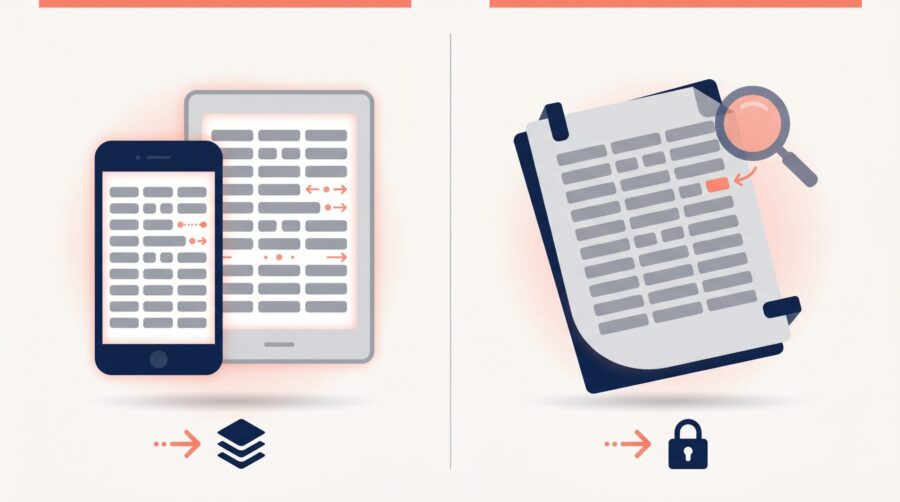
An EPUB and a PDF are two ways to package the same manuscript. An EPUB is reflowable: the text rearranges to fit any screen, which is what an ebook needs. A PDF is fixed: every page looks the same everywhere, which is why it is the format print uses. For a normal text ebook, use an EPUB.
What’s the Difference Between an EPUB and a PDF?
The difference comes down to one idea: reflowable versus fixed. An EPUB (electronic publication) is built from the same web technology as a web page, so its text can “reflow” to fit whatever screen it lands on, and the reader can change the font, the text size, and the spacing. A PDF (Portable Document Format) locks every word and image to an exact spot on a fixed page, so the layout never moves.
That difference shows up in what is actually inside each file. Unzip an EPUB and you find HTML files, a stylesheet, your images, and a manifest listing them all; it is a small website in a box, and the reading device draws the pages fresh each time from those ingredients. A PDF instead stores a finished drawing of each page: this glyph at this coordinate, this image at that size. Nothing recalculates, which is exactly what a printing press needs and exactly the wrong behaviour on a phone.
The current version of the ebook format is EPUB 3.3, published as a W3C Recommendation, and it is what the major stores build around. It is also worth knowing there are two kinds of ebook. The first is the reflowable EPUB, which suits novels and most non-fiction. The second is the fixed-layout ebook (a fixed-layout EPUB, or one of Amazon’s fixed-layout Kindle formats), where the page is locked like a PDF; that is for books whose design has to stay put, such as picture books, cookbooks, comics, and illustrated textbooks. We cover that choice in our guide to reflowable versus fixed-layout EPUB.
There is an accessibility consequence too, and it is the one authors tend to overlook. Because an EPUB hands control of type size and spacing to the reader, a reader with low vision can make your book legible without a magnifier. A PDF gives them a page they must pinch and pan across. If you want your book to work for the widest audience, the reflowable file is doing most of that work; our guide to making an accessible ebook covers what else the EPUB package needs.
Which Format Do the Ebook Stores Want?
Every major ebook store is built around EPUB, but they split into two camps on PDFs: those that will accept one and those that will not. Even where a PDF is accepted, “accepted” is not the same as “best”. The table below sets out what each store takes and what it does with a PDF once it has it.
| Store | Accepts EPUB | Accepts a PDF as the sellable ebook | What happens to a PDF |
|---|---|---|---|
| Amazon Kindle (KDP) | Yes (also Word and Kindle’s own KPF) | Yes, in nine listed languages | Converted to Kindle’s own format, like every other upload |
| Google Play Books | Yes (EPUB 3.3 preferred; 3 and 2 accepted) | Yes | Distributed as “original pages”; readers only get reflowable text if you also supply an EPUB |
| Apple Books | Yes (EPUB 3.3) | No | Not applicable |
| Kobo Writing Life | Yes (also Word and ODT, converted for you) | No | Not applicable |
Amazon’s list is the longest. KDP recommends EPUB and also accepts Word (DOC/DOCX) and its own KPF files; among additional formats it accepts HTML, Rich Text, plain text, and Adobe PDF, though PDF is only supported in English, French, German, Italian, Portuguese, Spanish, Catalan, Galician, and Basque. Whatever you upload, KDP converts it to Kindle’s own format, so the upload format is a starting point rather than a finished product.
Google Play Books is the store where a PDF survives as a PDF. It accepts both EPUB and PDF and offers readers two display modes, original pages and reflowable text. Google recommends supplying both files, because the PDF preserves your layout and the EPUB is what lets a reader resize the text. Send a PDF alone and phone readers are stuck pinching at a page designed for paper.
Apple Books and Kobo close the door on PDFs entirely. Apple works from EPUB 3.3. Kobo Writing Life accepts EPUB, Word, and ODT files and converts whatever you send into a Kobo EPUB, with a 100 MB ceiling on the file whichever type you upload. Neither will take a PDF as the book you sell.
So two stores accept a PDF and two refuse it, and even at the two that accept it the result is a compromise. An EPUB is the only file that works everywhere without one.
When Is a PDF the Right Choice?
A PDF is the correct file in three situations, and none of them is “the ebook you list in a store”. Knowing which situation you are in stops you producing the wrong file and finding out at upload.
The first is the printed book. Every print-on-demand printer takes a fixed PDF for the interior and another for the cover, because the press needs to know exactly where each mark falls on the paper. That file is a different output from your ebook, built to a specific trim size, and our guide to what makes a PDF print-ready covers what separates it from an ordinary export.
The second is a book whose page design carries the meaning. Cookbooks with stepped layouts, workbooks with fill-in boxes, sheet music, and technical books with wide tables all lose something when the text reflows. For a store listing, the answer there is a fixed-layout EPUB rather than a PDF; for a file you hand out yourself, a PDF is often simpler.
The third is anything the reader is meant to print or fill in: a worksheet, a checklist, a colouring page, a lead magnet. A reflowable file with no fixed page has nothing sensible to send to a printer, so a PDF is the right tool.
Can You Sell a PDF From Your Own Website?
Yes, and PDFs are common in direct sales because they need no store approval and open on any device without an app. If you are selling from your own site rather than through a retailer, nobody is checking your file against a submission guideline, so the choice is yours to make.
The trade-off is the same one the stores are trying to avoid. A reader who buys directly from you may open the file on a phone, and a page laid out for a 6 x 9 inch book will be small and awkward there. The usual answer is to offer both: a PDF for readers who want the printable, print-faithful version, and an EPUB for readers who want it to behave like an ebook. Selling direct also puts the question of copy protection in your hands rather than a retailer’s, which our explainer on how ebook DRM works covers.
One practical note from the files we produce: when a book exists as both a print PDF and an EPUB, the two are exports from the same source, not conversions of each other. That is why supplying both costs far less effort than it sounds, and why converting a finished PDF into an ebook after the fact is the expensive route.
What If a PDF Is All You Have?
Plenty of the books we convert begin life as a PDF, so it is a workable starting point. We prefer an editable source first (a Word, Pages, or InDesign file), because there the words are still words rather than shapes placed on a page, so the conversion stays clean. Extracting text from a finished PDF page is where faults creep in, so scan for these before you publish.
- Broken or run-together paragraphs. The extraction may split a paragraph at the end of every printed line instead of at the real paragraph break, or run separate paragraphs together with no break at all.
- Hyphens that should not be there. A soft hyphen added only to break a word at the end of a print line can become a permanent hard hyphen in the middle of your reflowed text.
- Missing characters from ligatures. Joined pairs such as “fi” and “fl” are a single typographic shape, not the separate letters, so they can drop out as blank spaces, turning “office” into “ofce”.
- Running heads and page numbers in the text. The chapter title or author name printed at the top of each page, and the folios (page numbers), can be pulled into the main text and interrupt the reading flow.
The pattern we see most often is that none of these faults is visible in the PDF itself; they appear only once the text has been lifted out and allowed to reflow, which is why a PDF-sourced ebook needs proofreading as a new file rather than a spot check. Our walkthrough of the most common PDF-to-EPUB conversion problems shows what to look for and how to fix each one.
The short version: if readers will read your book on screens of different sizes, they need an EPUB, and every major store is built to take one. Keep the PDF for the printed edition, for a fixed page design, and for anything a reader is meant to print. If a PDF is the only file you have, treat the ebook as a new file to be checked rather than a copy of a finished one.
Frequently Asked Questions
What is a fixed-layout ebook?
A fixed-layout ebook keeps the page design exactly in place, like a PDF, instead of letting the text reflow. The two main types are fixed-layout EPUB 3 and Amazon’s Print Replica. They suit books where the layout carries meaning, such as children’s picture books, cookbooks, comics, and complex textbooks, and the trade-off is that readers cannot resize the text.
Does Amazon have more than one fixed-layout format?
Yes. Amazon picks a Kindle fixed-layout format by book type: Print Replica preserves the exact print layout of textbooks and cookbooks (and does not run on e-ink Kindles); picture books and coffee-table books use Fixed Layout with Text Pop-Ups; comics use Image Pop-Ups, with Virtual Panels for manga; and large-type photo books use Fixed Layout without Pop-Ups. Amazon’s Comparing Formats chart lists them all.
Do I need separate files for print and ebook?
Usually yes. A printed book is produced from a fixed PDF and a reflowable ebook from an EPUB, and the two are separate outputs from the same manuscript. You generally cannot reuse the print PDF as your ebook and expect a good result on phones and e-readers.
What file should I give an ebook formatter or conversion service?
An editable source is best: a Word, Pages, or InDesign file. In those formats the words are still text, so the conversion stays accurate. A PDF can be used when it is all you have, but it usually needs extra cleanup because the text must be extracted from a fixed page.
Will a PDF work as a Kindle ebook?
It can. Amazon KDP accepts a PDF in nine languages and converts it, and it can also turn a PDF into a fixed-layout Print Replica for illustrated books. For an ordinary reflowable Kindle book, though, an EPUB or Word file gives a cleaner result than a converted PDF.
Is an EPUB bigger or smaller than a PDF?
It depends on the book. For a plain novel the two are similar in size, and the EPUB can even be slightly larger because it also contains the cover image. For heavily illustrated books the EPUB is usually smaller, because its images are compressed to meet each store’s ebook file-size limit while the print PDF keeps the full-resolution images.
Can I convert a PDF to EPUB myself?
You can, with tools such as Calibre or an online converter, and for a plain novel with no images the result is sometimes usable. The conversion is only extracting text from a fixed page, though, so it will not know which lines were paragraph breaks and which were line breaks, and it cannot tell a running head from body text. Read the whole file afterwards rather than spot-checking the first chapter.
